Goals
COEUS is focused on integration and interoperability.
These are the key goals that defined COEUS' development and its internal
organization.
For a simpler interpretation of COEUS internal structure, we thought about
organizing it according to a gardening metaphor.
The first thing to consider are single COEUS instances. These standalone applications are built according to a configuration file, in Javascript, and a setup file, in RDF, adopting COEUS Ontology.
Each COEUS instance integrates data in a mini-warehouse (or a large warehouse,
depending on the number of resources you are collecting!) and is called
a Seed.
Building a new seed involves three key steps:
- Configure the resource integration settings. In this step we define what data we want to import, where the data comes from, how the data sources are connected, how they will be integrated, and, at last, to what ontologies/models will the newly imported data be matched.
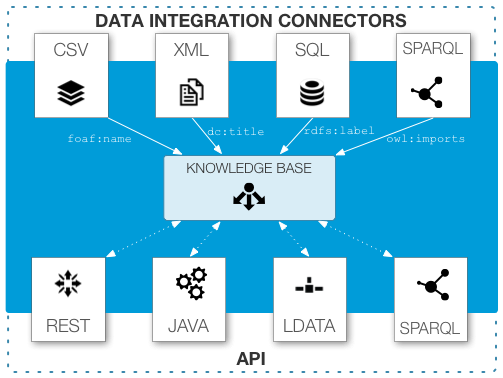
- Build the knowledge base. This step loads the configuration files and imports data using flexible connectors (for CSV, XML, SQL, SPARQL, RDF, ...) resources, abstracting it to a semantic environment, using advanced data/ontology selectors.
- Access the collected data. The final step involves the creation of custom client applications that access all the integrated data available in the knowledge base through any of the available APIs. This simplifies the creation of new applications for web, desktop or mobile platforms.
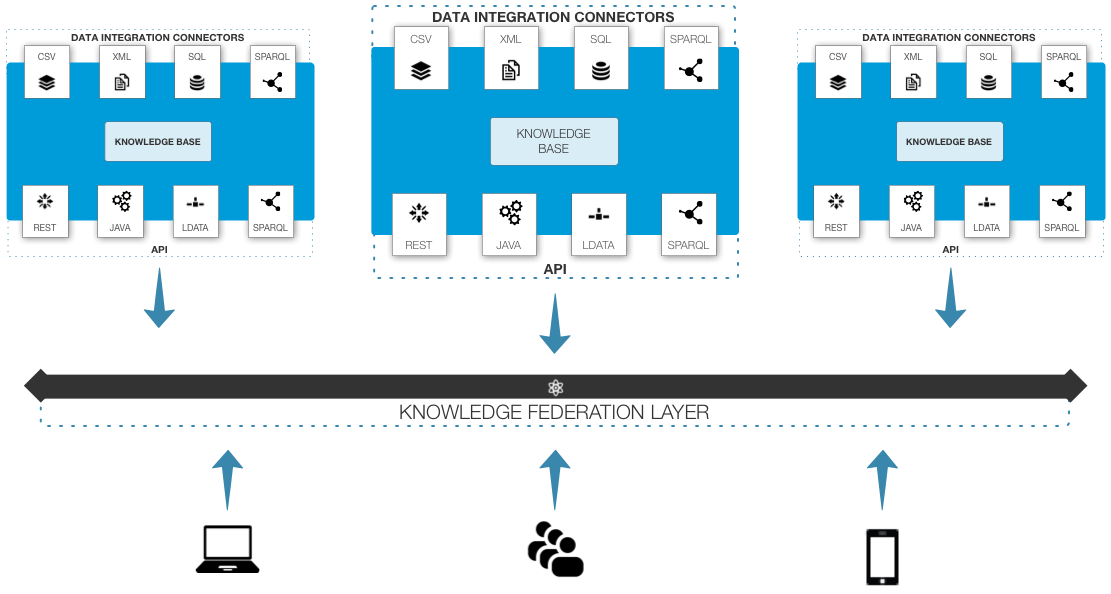
Since all seeds publish acquired data by default, we can deploy multiple seeds and connect them easily, creating a knowledge federation layer: the Garden.
Architecture
Seeds
A single COEUS instance is a seed. This represents a standalone application, built from integrated resources, with a public API.
Garden
And you get multiple seeds working together... they bloom, creating a garden: a truly federated semantic knowledge network.
Formats
The following code snippets highlight how to configure data loading from the various supported formats. The examples include one resource connector and one or more selectors.
XML (RSS)
# Resource configuration for BBC Sport News feed
coeus:resource_BBC coeus:endpoint "http://feeds.bbci.co.uk/sport/0/rss.xml"^^<&xsd;string>;
    coeus:extends coeus:concept_BBC;
    coeus:hasKey coeus:xml_BBC_id;
    coeus:isResourceOf coeus:concept_BBC;
    coeus:loadsFrom coeus:xml_BBC_id,
        coeus:xml_BBC_title,
        coeus:xml_description,
        coeus:xml_link;
    coeus:method "cache"^^<&xsd;string>;
    coeus:order "1"^^<&xsd;integer>;
    coeus:query "//item"^^<&xsd;string>;
    dc:publisher "xml"^^<&xsd;string>;
    dc:title "BBC"^^<&xsd;string>;
    a coeus:Resource,
        owl:NamedIndividual;
    rdfs:comment "Resource loader for BBC XML feeds."^^<&xsd;string>;
    rdfs:label "resource_bbc"^^<&xsd;string>.

# Loading news identifiers from XML XPath queries
coeus:xml_BBC_id coeus:isKeyOf coeus:resource_BBC;
    coeus:loadsFor coeus:resource_BBC;
    coeus:property "dc:identifier"^^<&xsd;string>;
    coeus:query "guid"^^<&xsd;string>;
    coeus:regex "[0-9]{5,}"^^<&xsd;string>;
    dc:title "BBC identifier"^^<&xsd;string>;
    a coeus:XML,
        owl:NamedIndividual;
    rdfs:label "xml_bbc_id"^^<&xsd;string>.

# Loading news titles from XML XPath queries
coeus:xml_BBC_title coeus:loadsFor coeus:resource_BBC;
    coeus:property "dc:title"^^<&xsd;string>;
    coeus:query "title"^^<&xsd;string>;
    dc:title "BBC entry title"^^<&xsd;string>;
    a coeus:XML,
        owl:NamedIndividual;
    rdfs:label "xml_bbc_title"^^<&xsd;string>.

# Loading news descriptions from XML XPath queries
coeus:xml_description coeus:loadsFor coeus:resource_BBC;
    coeus:property "dc:description"^^<&xsd;string>;
    coeus:query "description"^^<&xsd;string>;
    dc:title "entry description"^^<&xsd;string>;
    a coeus:XML,
        owl:NamedIndividual;
    rdfs:label "xml_description"^^<&xsd;string>.

# Loading news links from XML XPath queries
coeus:xml_link coeus:loadsFor coeus:resource_BBC;
    coeus:property "dc:publisher"^^<&xsd;string>;
    coeus:query "link"^^<&xsd;string>;
    dc:title "entry link"^^<&xsd;string>;
    a coeus:XML,
        owl:NamedIndividual;
    rdfs:label "xml_link"^^<&xsd;string>.
SQL
# Resource configuration for generic SQL resource
coeus:&coeus;resource_SomeSQL coeus:endpoint "jdbc:mysql://localhost:3306/\"db_name\"?user=\"user\"&password=\"pwd\""^^<&xsd;string>;
	coeus:hasKey coeus:&coeus;sql_id;
	coeus:isResourceOf coeus:&coeus;concept_SQL;
	coeus:loadsFrom coeus:&coeus;sql_id;
	coeus:method "cache"^^<&xsd;string>;
	coeus:order "20"^^<&xsd;integer>;
	coeus:query "SELECT b AS entry FROM hummer WHERE rel=37";
	dc:description "Resource connecting SQL information."^^<&xsd;string>;
	dc:publisher "sql"^^<&xsd;string>;
	dc:title "SomeSQL"^^<&xsd;string>;
	a coeus:&coeus;Resource,
		owl:NamedIndividual;
	rdfs:comment "Resource connecting SQL information."^^<&xsd;string>;
	rdfs:label "resource_somesql"^^<&xsd;string>.

# Loading data identifiers from SQL query "entry" variable
coeus:&coeus;sql_id coeus:isKeyOf coeus:&coeus;resource_SomeSQL;
	coeus:loadsFor coeus:&coeus;resource_SomeSQL;
	coeus:property "dc:title|dc:identifier"^^<&xsd;string>;
	coeus:query "entry"^^<&xsd;string>;
	dc:description "SQL identifier for data."^^<&xsd;string>;
	a coeus:&coeus;SQL,
		owl:NamedIndividual;
	rdfs:comment "SQL identifier for data."^^<&xsd;string>;
	rdfs:label "sql_id"^^<&xsd;string>.
CSV
# UniProt Resource configuration
coeus:resource_UniProt coeus:endpoint "http://www.uniprot.org/uniprot/?query=breast+cancer+AND+taxonomy%3a%22Homo+sapiens+%5b9606%5d%22&force=yes&format=tab&columns=id,entry%20name,reviewed,protein%20names,genes,organism,length"^^<&xsd;string>;
	coeus:extends coeus:concept_UniProt;
	coeus:hasKey coeus:csv_UniProt_entry;
	coeus:isResourceOf coeus:concept_UniProt;
	coeus:loadsFrom coeus:csv_UniProt_entry,
		coeus:csv_UniProt_entryname,
		coeus:csv_UniProt_proteinname;
	coeus:method "cache"^^<&xsd;string>;
	coeus:order "0"^^<&xsd;integer>;
	dc:publisher "csv"^^<&xsd;string>;
	dc:title "UniProt"^^<&xsd;string>;
	a coeus:Resource,
		owl:NamedIndividual;
	rdfs:comment "UniProt data loader."^^<&xsd;string>;
	rdfs:label "resource_uniprot".

# Loading UniProt accession entries from CSV column 0
coeus:csv_UniProt_entry coeus:isKeyOf coeus:resource_UniProt;
	coeus:loadsFor coeus:resource_UniProt;
	coeus:property "dc:identifier"^^<&xsd;string>;
	coeus:query "0"^^<&xsd;string>;
	dc:title "UniProt entry"^^<&xsd;string>;
	a coeus:CSV,
		owl:NamedIndividual;
	rdfs:label "csv_uniprot_entry"^^<&xsd;string>.

# Loading UniProt entry names from CSV column 1
coeus:csv_UniProt_entryname coeus:loadsFor coeus:resource_UniProt;
	coeus:property "dc:title"^^<&xsd;string>;
	coeus:query "1"^^<&xsd;string>;
	dc:title "UniProt Entry Name"^^<&xsd;string>;
	a coeus:CSV,
		owl:NamedIndividual;
	rdfs:label "csv_uniprot_entryname"^^<&xsd;string>.

# Loading UniProt proteint names from CSV column 3
coeus:csv_UniProt_proteinname coeus:loadsFor coeus:resource_UniProt;
	coeus:property "dc:description"^^<&xsd;string>;
	coeus:query "3"^^<&xsd;string>;
	dc:title "UniProt Protein Name"^^<&xsd;string>;
	a coeus:CSV,
		owl:NamedIndividual;
	rdfs:label "csv_uniprot_proteinname"^^<&xsd;string>.
JSON
# Mesh Json Resource configuration
coeus:resource_mesh_cache coeus:endpoint "http://bioinformatics.ua.pt/diseasecard/api/triple/diseasecard:uniprot_P51587/coeus:isAssociatedTo/obj"^^<&xsd;string>;
	coeus:extends coeus:concept_mesh;
	coeus:hasKey coeus:json_mesh_type;
	coeus:isResourceOf coeus:concept_mesh;
	coeus:loadsFrom coeus:json_mesh_type;
	coeus:method "cache"^^<&xsd;string>;
	coeus:order "5"^^<&xsd;string>;
	coeus:query "$.results.bindings[*]"^^<&xsd;string>;
	dc:publisher "json"^^<&xsd;string>;
	dc:title "Resource mesh cache"^^<&xsd;string>;
	a coeus:Resource,
		owl:NamedIndividual;
	rdfs:comment "resource for mesh terms cache"^^<&xsd;string>;
	rdfs:label "resource_mesh_cache"^^<&xsd;string>.
# Loading mesh id from Json
coeus:json_mesh_id coeus:isKeyOf coeus:resource_mesh_cache_ext;
	coeus:loadsFor coeus:resource_mesh_cache_ext;
	coeus:property "dc:identifier"^^<&xsd;string>;
	coeus:query "$.obj.value"^^<&xsd;string>;
	coeus:regex "D[0-9]{6}"^^<&xsd;string>;
	dc:title "json mesh identifier"^^<&xsd;string>;
	a coeus:class_json,
		owl:NamedIndividual;
	rdfs:label "json_mesh_id"^^<&xsd;string>.
# Loading mesh type from Json
coeus:json_mesh_type coeus:loadsFor coeus:resource_mesh_cache;
	coeus:property "rdfs:comment"^^<&xsd;string>;
	coeus:query "$.obj.type"^^<&xsd;string>;
	dc:title "json mesh type"^^<&xsd;string>;
	a coeus:class_json,
		owl:NamedIndividual;
	rdfs:label "json_mesh_type"^^<&xsd;string>.
# Loading mesh uri from Json
coeus:json_mesh_uri coeus:loadsFor coeus:resource_mesh_complete;
	coeus:property "dc:description"^^<&xsd;string>;
	coeus:query "$.obj.value"^^<&xsd;string>;
	dc:title "json mesh uri"^^<&xsd;string>;
	a coeus:class_json,
		owl:NamedIndividual;
	rdfs:label "json_mesh_uri"^^<&xsd;string>.
RDF
# UniProt RDF Resource configuration
coeus:resource_uniprot_rdf_complete coeus:endpoint "http://www.uniprot.org/uniprot/#replace#.rdf"^^<&xsd;string>;
	coeus:extends coeus:concept_uniprot;
	coeus:extension "dc:identifier"^^<&xsd;string>;
	coeus:isResourceOf coeus:concept_uniprot;
	coeus:method "complete"^^<&xsd;string>;
	coeus:order "12";
	coeus:query "http://purl.uniprot.org/uniprot/"^^<&xsd;string>;
	dc:publisher "rdf"^^<&xsd;string>;
	dc:title "Resource Uniprot RDF complete"^^<&xsd;string>;
	a coeus:Resource,
		owl:NamedIndividual;
	rdfs:comment "resource uniprot for rdf data"^^<&xsd;string>;
	rdfs:label "resource_uniprot_rdf_complete"^^<&xsd;string>.
LinkedData
# UniProt LinkedData Resource configuration
coeus:resource_uniprot_ld_complete coeus:endpoint "http://purl.uniprot.org/uniprot/#replace#"^^<&xsd;string>;
	coeus:extends coeus:concept_uniprot;
	coeus:extension "dc:identifier"^^<&xsd;string>;
	coeus:hasKey coeus:ld_uniprot_complete;
	coeus:isResourceOf coeus:concept_uniprot;
	coeus:loadsFrom coeus:ld_uniprot_complete;
	coeus:method "complete"^^<&xsd;string>;
	coeus:order "14";
	dc:publisher "ld"^^<&xsd;string>;
	dc:title "Resource Uniprot Linked Data"^^<&xsd;string>;
	a coeus:Resource,
		owl:NamedIndividual;
	rdfs:comment "resource uniprot for linked data "^^<&xsd;string>;
	rdfs:label "resource_uniprot_ld_complete"^^<&xsd;string>.
# Make the association
coeus:ld_uniprot_complete coeus:isKeyOf coeus:resource_uniprot_ld_complete;
	coeus:loadsFor coeus:resource_uniprot_ld_complete;
	coeus:property "rdfs:seeAlso"^^<&xsd;string>;
	coeus:query ""^^<&xsd;string>;
	dc:title "linkeddata uniprot complete"^^<&xsd;string>;
	a coeus:LD,
		owl:NamedIndividual;
	rdfs:label "ld_uniprot_complete"^^<&xsd;string>.
Data Sources
UniProt entries
# UniProt Resource configuration
coeus:resource_UniProt coeus:endpoint "http://www.uniprot.org/uniprot/?query=breast+cancer+AND+taxonomy%3a%22Homo+sapiens+%5b9606%5d%22&force=yes&format=tab&columns=id,entry%20name,reviewed,protein%20names,genes,organism,length"^^<&xsd;string>;
	coeus:extends coeus:concept_UniProt;
	coeus:hasKey coeus:csv_UniProt_entry;
	coeus:isResourceOf coeus:concept_UniProt;
	coeus:loadsFrom coeus:csv_UniProt_entry,
		coeus:csv_UniProt_entryname,
		coeus:csv_UniProt_proteinname;
	coeus:method "cache"^^<&xsd;string>;
	coeus:order "0"^^<&xsd;integer>;
	dc:publisher "csv"^^<&xsd;string>;
	dc:title "UniProt"^^<&xsd;string>;
	a coeus:Resource,
		owl:NamedIndividual;
	rdfs:comment "UniProt data loader."^^<&xsd;string>;
	rdfs:label "resource_uniprot".

# Loading UniProt accession entries from CSV column 0
coeus:csv_UniProt_entry coeus:isKeyOf coeus:resource_UniProt;
	coeus:loadsFor coeus:resource_UniProt;
	coeus:property "dc:identifier"^^<&xsd;string>;
	coeus:query "0"^^<&xsd;string>;
	dc:title "UniProt entry"^^<&xsd;string>;
	a coeus:CSV,
		owl:NamedIndividual;
	rdfs:label "csv_uniprot_entry"^^<&xsd;string>.

# Loading UniProt entry names from CSV column 1
coeus:csv_UniProt_entryname coeus:loadsFor coeus:resource_UniProt;
	coeus:property "dc:title"^^<&xsd;string>;
	coeus:query "1"^^<&xsd;string>;
	dc:title "UniProt Entry Name"^^<&xsd;string>;
	a coeus:CSV,
		owl:NamedIndividual;
	rdfs:label "csv_uniprot_entryname"^^<&xsd;string>.

# Loading UniProt proteint names from CSV column 3
coeus:csv_UniProt_proteinname coeus:loadsFor coeus:resource_UniProt;
	coeus:property "dc:description"^^<&xsd;string>;
	coeus:query "3"^^<&xsd;string>;
	dc:title "UniProt Protein Name"^^<&xsd;string>;
	a coeus:CSV,
		owl:NamedIndividual;
	rdfs:label "csv_uniprot_proteinname"^^<&xsd;string>.
InterPro/PDB/PROSITE identifiers
# PDB Resource configuration
coeus:resource_PDB coeus:endpoint "http://uniprot.org/uniprot/#replace#.xml"^^<&xsd;string>;
	coeus:extends coeus:concept_UniProt;
	coeus:hasKey coeus:xml_PDB_id;
	coeus:isResourceOf coeus:concept_PDB;
	coeus:loadsFrom coeus:xml_PDB_id;
	coeus:method "cache"^^<&xsd;string>;
	coeus:order "11"^^<&xsd;integer>;
	coeus:query "//entry"^^<&xsd;string>;
	dc:publisher "xml"^^<&xsd;string>;
	dc:title "PDB"^^<&xsd;string>;
	a coeus:Resource,
		owl:NamedIndividual;
	rdfs:comment "Resource connecting PDB information."^^<&xsd;string>;
	rdfs:label "resource_pdb"^^<&xsd;string>.

# Loading PDB identifiers from UniProt's XML (with XPath)
coeus:xml_PDB_id coeus:isKeyOf coeus:resource_PDB;
	coeus:loadsFor coeus:resource_PDB;
	coeus:property "dc:title|dc:identifier"^^<&xsd;string>;
	coeus:query "//dbReference[@type='PDB']/@id"^^<&xsd;string>;
	dc:publisher "xml"^^<&xsd;string>;
	dc:title "PDB id"^^<&xsd;string>;
	a coeus:XML,
		owl:NamedIndividual;
	rdfs:label "xml_pdb_id"^^<&xsd;string>.
Ontology
For organising all resources and setting up a new seed, COEUS ontology comes to play.
Model
To manage as various data organisations as possible, COEUS data structure is organised in a tree: Entity > Concept > Item.
Entities are classes for the upper data types, Concepts for a middle division and Items for individual level.
For example, to create a seed with transportation information we might have the following structure:
-
Entity: Vehicle
-
Concept: Land
- Item: Car
- Item: Motorbike
- Concept: Air
- Concept: Water
-
Concept: Land
Abstraction
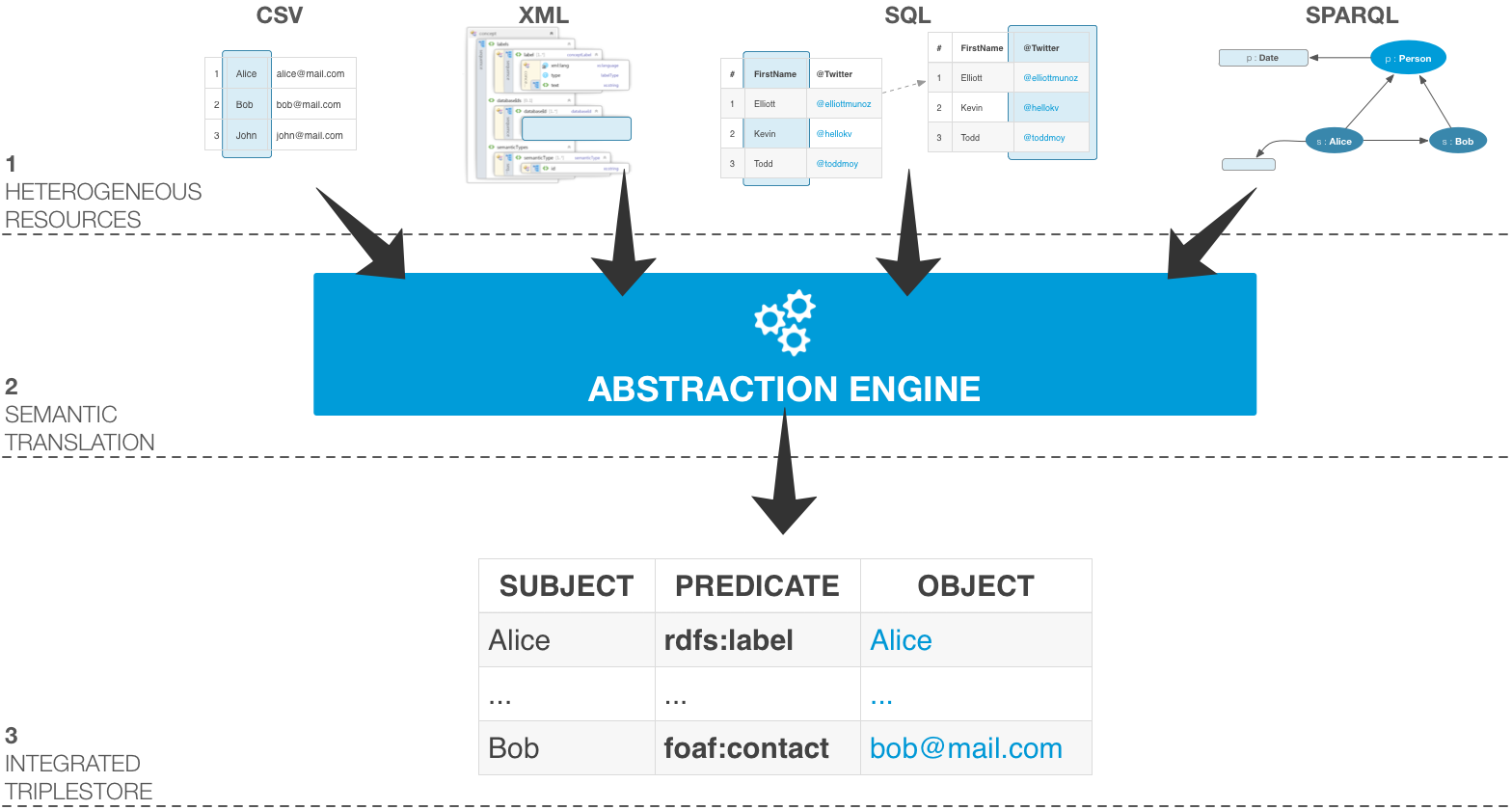
The abstraction layer used the instance configuration to specify the precise bits of information that will be translated into the knowledge graph.
Triplification
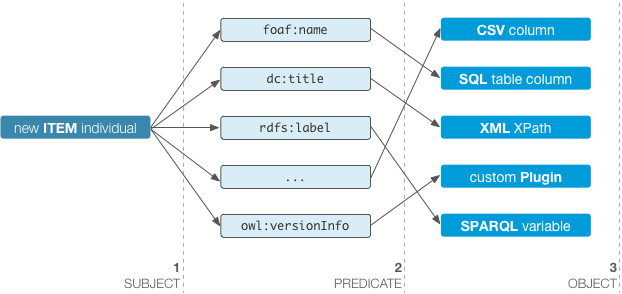
During the abstraction process, data are triplified. This means that new triples are generated in real time matching the configured properties. Developers can define the CSV columns, SQL query or XPath evaluation results that will be mapped to a configurable predicate from any ontology.
Classes
Seed
- Seed
- A Seed defines a single framework instance. In COEUS? model, Seed individuals are used to store a variety of application settings, such as component information, application descriptions, versioning or authors. Seed individuals are also connected to included entities through the :includes property (inverse of :isIncludedIn). This permits access to all data available in the seed, providing an over-arching entry point to the system information
Entity - Concept - Item
- Entity
- Entity individuals match the general data terms. These are ?umbrella? elements, grouping concepts with a common set of properties (the :isEntityOf predicate).
- Concept
- Concept individuals are area-specific terms, aggregating any number of items (the :isConceptOf object property) and belonging to a unique entity (the :hasEntity object property).
- Item
- Item individuals are the basic terms, with no further granularity and representing unique identifiers from integrated datasets. Item individuals are connected through the :isAssociatedTo object property and linked uniquely to a concept through the :hasConcept predicate.
Resources
- Resource
- External resource connector.
Resource individuals are used to store external resource integration properties. The configuration is further specialised with CSV, XML, JSON, RDF, TTL, SQL and SPARQL classes, mapping precise dataset results to the application model, through direct concept relationships. With the :hasResource property, the framework knows exactly what resources are connected to each concept and, subsequently, how to load data for each independent concept, generating new items. - CSV
- External CSV selector.
Defines individual configuration properties to perform custom data abstractions from CSV files into COEUS' knowledge base. - XML
- External XML selector.
Defines individual configuration properties to perform custom data abstractions from XML files into COEUS' knowledge base. - JSON
- External JSON selector.
Defines individual configuration properties to perform custom data abstractions from JSON files into COEUS' knowledge base. - LinkedData
- External LinkedData selector.
Defines individual configuration properties to perform external data link into COEUS' knowledge base. - RDF
- External RDF selector.
Defines individual configuration properties to perform data import from RDF files into COEUS' knowledge base. - TTL
- External TTL (Turtle) selector.
Defines individual configuration properties to perform data import from Turtle files into COEUS' knowledge base. - SQL
- External SQL selector.
Defines individual configuration properties to perform custom data abstractions from SQL query results into COEUS' knowledge base. - SPARQL
- External SPARQL selector.
Defines individual configuration properties to perform custom data abstractions from SPARQL query results into COEUS' knowledge base.
Properties
One of COEUS' key liberating features (and of the Semantic Web) is the ability to use any ontology internally. Hence, we extend the existing COEUS ontology with well-known properties from external ontologies.
Data Properties
| Property | Description | Mandatory | Domain | Range | Sample |
|---|---|---|---|---|---|
coeus:endpoint |
Defines a Resource endpoint.
|
YES | Resource | String | file:///coeus.xml |
coeus:extension |
Defines the source element for a Resource extension query (where the data comes from). | NO | Resource | String | rdfs:label |
coeus:line |
Starting line for CSV resource import. | NO | Resource | String | 2 |
coeus:loaded |
Defines if a Seed, Entity, Concept is or is not built. | NO | Seed, Entity, Concept | Boolean | false |
coeus:method |
Defines a Resource integration method.
|
YES | Resource | String | cache |
coeus:order |
Defines the Resource integration order (ASC). | NO | Resource | Integer | 0 (first) |
coeus:property |
Property selector defining the predicates to where integrated will be loaded to. Multiple predicates can be separated with the pipe (|) delimiter. | YES | CSV, XML, SQL, SPARQL | String | dc:title |
coeus:query |
Query selector defining the queries to apply to integrated resources for data translation.
|
YES | Resource, CSV, XML, SQL, SPARQL | String | //item |
coeus:regex |
Defines regular expression to get Item individual identification token from integrated resources. | NO | CSV, XML, SQL, SPARQL | String | [0-9]{5,} |
dc:publisher |
Defines the Resource connector type: CSV, XML, JSON, RDF, TTL, SQL or SPARQL. The selectors' configuration will be loaded according to this value. | YES | Resource | String | sql |
dc:title |
All individuals must have a valid title. | YES | Any | String | COEUS |
rdfs:comment |
All individuals must have a valid comment/description. | YES | Any | String | COEUS is a new semantic web framework. |
rdfs:label |
All individuals must have a valid label. | YES | Any | String | seed_COEUS |
Object Properties
| Property | Description | Mandatory | Domain | Range | Sample |
|---|---|---|---|---|---|
coeus:extends |
A Resource extends a Concept. This means that the subject resource will select data for processing from the concept Item individuals. | YES | Resource | Concept | coeus:resource_UniProt coeus:extends coeus:concept_UniProt |
coeus:hasConcept |
An Item individual will belong (has) a certain Concept. | AUTO | Item | Concept | coeus:uniprot_P51587 coeus:hasConcept coeus:concept_UniProt |
coeus:hasEntity |
A Concept belongs to (has) an Entity. | YES | Concept | Entity | coeus:concept_UniProt coeus:hasEntity coeus:entity_Protein |
coeus:hasKey |
A Resource has a given key selector. The key selector will be used to generate unique Item individual identifications (i.e. URIs) from the integrated resources. | YES | Resource | CSV, XML, SQL, SPARQL | coeus:resource_UniProt coeus:hasKey coeus:csv_UniProt_id |
coeus:hasResource |
A Concept is related to (has) a Resource. This defines the Resource individual connector that loads the data (generating items) for a given Concept. | YES | Concept | Resource | coeus:concept_UniProt coeus:hasResource coeus:resource_UniProt |
coeus:includes |
Defines which Entity individuals are included in Seed individuals. | YES | Seed | Entity | coeus:seed_COEUS coeus:includes coeus:entity_Protein |
coeus:isAssociatedTo |
Default association between two Item individuals loaded through Resource extensions (in the dependency graph). | AUTO | Item | Item | coeus:uniprot_P51587 coeus:isAssociatedTo coeus:hgnc_BRCA2 |
coeus:isConceptOf |
A concept individual is the Concept of multiple Item individuals. | AUTO | Concept | Item | coeus:concept_HGNC coeus:isConceptOf coeus:hgnc_BRCA2 |
coeus:isConnectedTo |
Default association between two Concept individuals. If two concepts are connected, then all their children items will be connected. | NO | Concept | Concept | coeus:concept_UniProt coeus:isConnectedTo coeus:concept_HGNC |
coeus:isEntityOf |
An individual entity is the Entity of one or more Concept individuals. | YES | Entity | Concept | coeus:entity_Protein coeus:isEntityOf coeus:concept_UniProt |
coeus:isExtendedBy |
An individual concept is extended by one or more Resource individuals (the connectors that load the data for the Concept). | YES | Concept | Resource | coeus:concept_UniProt coeus:isExtendedBy coeus:resource_HGNC |
coeus:isIncludedIn |
An entity individual is included in a seed. | YES | Entity | Seed | coeus:entity_Protein coeus:isIncludedIn coeus:seed_COEUS |
coeus:isKeyOf |
A selector individual act as the loading key for generating unique Item individuals identification (URIs) to a given resource. | YES | CSV, XML, SQL, SPARQL | Resource | coeus:csv_UniProt_id coeus:isKeyOf coeus:resource_UniProt |
coeus:isResourceOf |
A resource individual is the Resource connector for the given Concept individual. | YES | Resource | Concept | coeus:resource_UniProt coeus:isResourceOf coeus:concept_UniProt |
coeus:loadsFor |
A CSV, XML, SQL or SPARQL connector loads data for a Resource. | YES | CSV, XML, SQL, SPARQL | Resource | coeus:csv_UniProt_id coeus:loadsFor coeus:resource_UniProt |
coeus:loadsFrom |
A Resource loads data from a CSV, XML, SQL or SPARQL connector. | YES | Resource | CSV, XML, SQL, SPARQL | coeus:resource_UniProt coeus:loadsFrom coeus:csv_UniProt_id |
[1] If query is not provided it will be tested some popular delimiters (such '\t', ';', .. ) with the default values for the quotes delimiter ('"') and for the headers skip number (1).
Java
API
How are your Javadoc reading skills?
The Java documentation is pretty self-explanatory. For interacting with the knowledge base, use the API class to add new triples and perform SPARQL queries directly.
/* Invoke getTriple(...); */
pt.ua.bioinformatics.api.API.getTriple(?coeus:uniprot_P51587?, ?p?, ?o?, ?xml?);
/* Invoke select(...); */
pt.ua.bioinformatics.api.API.select("SELECT ...", "js", false);
/* Invoke addStatement(...); */
pt.ua.bioinformatics.api.API.addStatement(Boot.getAPI().createResource(PrefixFactory.decode(sub)), Predicate.get(pred), Boot.getAPI().createResource(PrefixFactory.decode(obj)));
Factories
COEUS includes multiple factories to perform quick transformation between URIs, concepts, strings, prefixes, etc. We use these static methods throughout the entire framework, thus facilitating string-based data conversions.
Prefix Factory
The prefix factory is utility class for Prefix information and transformations. This class stores an internal prefix map, enabling quick composition or decomposition of full object URIs.
/* Invoke getURIForPrefix(...); */
pt.ua.bioinformatics.api.PrefixFactory.getURIForPrefix("rdfs");
/* Invoke encode(...); */
pt.ua.bioinformatics.api.PrefixFactory.encode("http://bioinformatics.ua.pt/coeus/resource/Item");
Item Factory
The item factory is a utility class for Item transformation tasks, such as getting an identifier from the full individual item label.
/* Invoke getTokenFromItem...); */
pt.ua.bioinformatics.api.ItemFactory.getTokenFromItem("http://bioinformatics.ua.pt/coeus/resource/omim_143100");
REST
Read access
To access all triples in COEUS Semantic Storage, you can combine subjects, objects or predicates wildcards to iteratively get data. The wildcards' usage is highlighted in the following table.
| Element | Description | Sample |
|---|---|---|
subject | The existing or matching subject. | coeus:uniprot_P51582 |
predicate | The existing or matching predicate. | coeus:isAssociatedTo |
object | The existing or matching object. | obj |
format | The output format. | csv |
Some data output examples are:
- ../api/triple/coeus:uniprot_P78312/p/o gets all predicates (p) and objects (o) related to uniprot_P78312
- ../api/triple/coeus:uniprot_P78312/coeus:isAssociatedTo/obj/csv gets all objects (obj) with a coeus:isAssociatedTo relationship to uniprot_P78312 (in CSV format)
Delete access
To delete triples in COEUS Semantic Storage, you must combine the subject, predicate and object wildcard to iteratively remove the data. The delete API URL structure is:
- ../api/<API key>/delete/<subject>/<predicate>/<object>
| Element | Description | Sample |
|---|---|---|
API key | Value for the seed access API key (defined in config.js). | coeus |
subject | The existing subject. | coeus:uniprot_P51582 |
predicate | The existing predicate. | coeus:isAssociatedTo |
object | The existing object. | coeus:go_GO:0033593 |
Some examples are:
- ../api/api_key/delete/coeus:uniprot_Q13428/dc:title/Q13428
- ../api/api_key/delete/coeus:uniprot_P51587/coeus:isAssociatedTo/coeus:go_GO:0033593
Write access
COEUS write API provides a simple URL to add new triples to a seed's knowledge base. This enables also writing sets of triples by being invoked recursively. The write API URL structure is:
- ../api/<API key>/write/<subject>/<predicate>/<object>
| Element | Description | Sample |
|---|---|---|
API key | Value for the seed access API key (defined in config.js). | coeus |
subject | The subject to write. | coeus:uniprot_P51582 |
predicate | The predicate to write. | coeus:isAssociatedTo |
object | The object to write. | coeus:go_GO:0033593 |
Some examples are:
- ../api/api_key/write/coeus:uniprot_Q13428/dc:title/Q13428
- ../api/api_key/write/coeus:uniprot_P51587/coeus:isAssociatedTo/coeus:go_GO:0033593
Update Access
COEUS update API provides a straightforward URL to update exiting triples in the knowledge base. The main difference between the delete or write API calls is the adding of the new object separated by a comma:
- ../api/<API key>/update/<subject>/<predicate>/<old_object>,<new_object>
| Element | Description | Sample |
|---|---|---|
API key | Value for the seed access API key (defined in config.js). | coeus |
subject | The existing subject. | coeus:uniprot_P51582 |
predicate | The existing predicate. | coeus:isAssociatedTo |
old_object,new_object | Combination of the existing object (old_object) and the new one (new_object). | coeus:go_GO:0033593, coeus:pdb_1N0W |
Some examples include:
- ../api/api_key/update/coeus:uniprot_Q13428/dc:title/BRCA2_HUMAN,TCOF_HUMAN
- ../api/api_key/update/coeus:uniprot_P51587/coeus:isAssociatedTo/coeus:go_GO:0033593,coeus:pdb_1N0W
For XSD types just append the datatype (xsd:int, xsd:string,..) at the start of the literal:
- ../api/api_key/update/coeus:resource_BBC/dc:creator/xsd:string:pdrlps,xsd:string:uavr
The write/delete/update REST API returns a JSON object with the server response. The status field of that object contains a numeric value with the write operation output.
- 100
- All OK, triples written/deleted/updated to knowledge base.
- 200
- Error adding/deleting/updating triples to knowledge base (check exception output).
- 201
- Invalid subject.
- 202
- Invalid predicate.
- 203
- Invalid object.
- 403
- Forbidden access, invalid API key.
SPARQL
All data collected in a COEUS instance can be accessed through a SPARQL endpoint and taking advantage of SPARQL's advanced querying features.
The endpoint default location is at /sparql.
PREFIX coeus: <http://bioinformatics.ua.pt/coeus/resource/>

SELECT ?p ?o {coeus:uniprot_P51587 ?p ?o}
SPARQL Federation
With the SPARQL endpoint online, querying multiple distributed COEUS instances is a straightforward process. Moreover, additional knowledge bases with public SPARQL endpoints can also be put into the mix, providing an holistic perspective over a distributed knowledge network.
PREFIX coeus: <http://bioinformatics.ua.pt/coeus/resource/>
PREFIX dc: <http://purl.org/dc/elements/1.1/>
PREFIX diseasome: <http://www4.wiwiss.fu-berlin.de/diseasome/resource/diseasome/>
PREFIX rdfs: <http://www.w3.org/2000/01/rdf-schema#>
PREFIX coeus: <http://bioinformatics.ua.pt/coeus/>

SELECT ?pdb ?mesh
WHERE{
    {
        SERVICE <http://www4.wiwiss.fu-berlin.de/diseasome/sparql>
        {
                <http://www4.wiwiss.fu-berlin.de/diseasome/resource/genes/BRCA2> rdfs:label ?label
        }
    }
    {
        SERVICE <http://bioinformatics.ua.pt/coeus/sparql>
        {
                _:gene dc:title ?label.
                _:gene coeus:isAssociatedTo ?uniprot
        }
    }
    {
        SERVICE <http://bioinformatics.ua.pt/coeus/sparql>
        {
                ?uniprot coeus:isAssociatedTo ?pdb.
                ?pdb coeus:hasConcept coeus:concept_PDB
        }
    }
}
}
LinkedData
COEUS publishes all data through LinkedData patterns & guidelines by default. With pubby included in all COEUS seeds, data is easily available to external appications.
Using the ../resource/* pattern, you can access object data in the web or RDF browsers.
- ../resource/uniprot_P78312 HTML page for UniProt P78312
- ../data/uniprot_P78312?output=xml RDF content for UniProt P78312
Javascript
Data Access
Easily perform SPARQL queries to your COEUS-generated endpoint with this new library.
Check the documentation and the library at ../assets/js/coeus.sparql.js.
Changes on Seed
COEUS Write/Update/Delete API can be easily accessed in Javascript.
Check the documentation and sample at ../assets/js/coeus.api.js.
Nanopublications (Generation Process)
COEUS has now the capability to share your data in the Nanopublication format. With this new plugin you can transform your integrated data in this prominent format by following the next steps:
- Go to the Nanopublication Section on the Dashboard.
- Select the concept root and related data that will generate the nanopublications.
- Fill out the provenance and additional information about the nanopublications.
- Start to Build nanopublications.
- When finished you can view the concept data items according to the nanopublication format.
SWAT4LS (with web interface)
Visit website
December 9-12, 2013 Edinburgh, United Kingdom
In this tutorial/hands-on session, we will guide you through the process of creating your own custom COEUS knowledge base. You will learn how to:
- Create a new COEUS instance
- From GitHub download to web deployment
- Integrate data from heterogeneous *omics sources into your COEUS knowledge base
- Create your mashup merging multiple datasets
- Explore COEUS API to access aggregated data
- Build new rich web information systems using the API
- Access knowledge federation through the SPARQL and LinkedData interfaces
Multiple sources (without web interface)
In this first tutorial we will build a semantic knowledge base aggregating data from multiple sources. The tutorial configuration and datasets are provided
on the default COEUS package. These include two examples: 1) COEUS News Aggregator (newsaggregator) and 2) COEUS Protein Integrator (proteinator).
In the first example COEUS aggregates data from multiple news sources, which are available in RSS/XML format, making
it fairly easy to load and process. Moreover, the majority of online news outlets provides access to all the news through a RSS feed.
For the second example, COEUS loads imports data from multiple protein-related resources, creating our targeted proteomics knowledge base. Protein entries are created for
resources from UniProt, PDB, Prosite and InterPro. UniProt entries are also associated with Gene Ontology terms and HGNC genes.
Since most of the tasks are very similar for both problems, this tutorial adequatly highlights the places where the options differ from the news aggregtor to the proteinator.
To create these applications, we will proceed as follows:
Setup
To launch our new seed we start by downloading the COEUS package from GitHub or checking out the source code into a local installation. Further
information regarding what's included in COEUS' package can be seen in the downloads section of this documentation.
For simplicity purposes, COEUS is provided as a NetBeans web project ready to be open. Hence, we just open the folder on our local NetBeans installation and setup the correct
library references and select the instance server. By default, the new COEUS seed will run on a /coeus/ application path, but we can easily change it in the project properties.
To finish our initial COEUS setup, we just need to create a new database and database user to be used as the triplestore backend by Jena. In this case, we will create a new database
called coeus, and a new user also called demo (with password demo) with enough permissions to read and write in the database.
Seed
Customizing the seed configuration is the most cumbersome task for COEUS deployment. The seed configuration defines the internal knowledge base structure, the application model,
the external resources being loaded and how the heterogeneous data are integrated. To simplify this task, the use of Protege is advised.
A sample seed configuration file is provided for each scenario. These scenarios are further detailed next.
- News Aggregator
- Setup file located in
src/java/newsaggregator/setup.rdf - Protein Integrator
- Setup file located in
src/java/proteinator/setup.rdf
News aggregator
The first step is to define how our news integration model will map to COEUS' ontology. COEUS' ontology revolves a tree-based structure, Entity-Concept-Item, which will be used to organize our data collection in the knowledge base. For this scenario, we want to have a set of news organized according to their original source (an RSS/XML feed). We will use four sports journals: the international Reuters sports section, the british BBC sports section, the spanish Marca journal and the portuguese A Bola journal. For this matter, we will have the following structure:
-
News (Entity)
- Reuters (Concept) <-> Reuters (Resource)
- BBC (Concept) <-> BBC (Resource)
- Marca (Concept) <-> Marca (Resource)
- A Bola (Concept) <-> A Bola (Resource)
These examples can be found in the COEUS package.
<owl:NamedIndividual rdf:about="http://bioinformatics.ua.pt/coeus/resource/entity_News">
    <rdf:type rdf:resource="http://bioinformatics.ua.pt/coeus/resource/Entity"/>
    <rdfs:label rdf:datatype="&xsd;string">entity_news</rdfs:label>
    <dc:title rdf:datatype="&xsd;string">News</dc:title>
    <rdfs:comment rdf:datatype="&xsd;string">News entity for COEUS News Aggregator</rdfs:comment>
    <isIncludedIn rdf:resource="http://bioinformatics.ua.pt/coeus/resource/seed_coeusna"/>
</owl:NamedIndividual>
<owl:NamedIndividual rdf:about="http://bioinformatics.ua.pt/coeus/resource/concept_Reuters">
    <rdf:type rdf:resource="http://bioinformatics.ua.pt/coeus/resource/Concept"/>
    <rdfs:label rdf:datatype="&xsd;string">concept_reuters</rdfs:label>
    <dc:title rdf:datatype="&xsd;string">Reuters</dc:title>
    <hasEntity rdf:resource="http://bioinformatics.ua.pt/coeus/resource/entity_News"/>
    <isExtendedBy rdf:resource="http://bioinformatics.ua.pt/coeus/resource/resource_Reuters"/>
    <hasResource rdf:resource="http://bioinformatics.ua.pt/coeus/resource/resource_Reuters"/>
</owl:NamedIndividual>

<owl:NamedIndividual rdf:about="http://bioinformatics.ua.pt/coeus/resource/concept_BBC">
    <rdf:type rdf:resource="http://bioinformatics.ua.pt/coeus/resource/Concept"/>
    <rdfs:label rdf:datatype="&xsd;string">concept_bbc</rdfs:label>
    <dc:title rdf:datatype="&xsd;string">BBC</dc:title>
    <hasEntity rdf:resource="http://bioinformatics.ua.pt/coeus/resource/entity_News"/>
    <hasResource rdf:resource="http://bioinformatics.ua.pt/coeus/resource/resource_BBC"/>
    <isExtendedBy rdf:resource="http://bioinformatics.ua.pt/coeus/resource/resource_BBC"/>
</owl:NamedIndividual>
resource_BBC)
and the associated selectors (targeted xml_BBC_id, xml_BBC_title, and the generic xml_description).
to integrate data for the BBC concept.
<owl:NamedIndividual rdf:about="http://bioinformatics.ua.pt/coeus/resource/resource_BBC">
    <rdf:type rdf:resource="http://bioinformatics.ua.pt/coeus/resource/Resource"/>
    <rdfs:label rdf:datatype="&xsd;string">resource_bbc</rdfs:label>
    <query rdf:datatype="&xsd;string">//item</query>
    <order rdf:datatype="&xsd;integer">1</order>
    <dc:title rdf:datatype="&xsd;string">BBC</dc:title>
    <rdfs:comment rdf:datatype="&xsd;string">Resource loader for BBC XML feeds.</rdfs:comment>
    <method rdf:datatype="&xsd;string">cache</method>
    <endpoint rdf:datatype="&xsd;string">http://feeds.bbci.co.uk/sport/0/rss.xml</endpoint>
    <dc:publisher rdf:datatype="&xsd;string">xml</dc:publisher>
    <extends rdf:resource="http://bioinformatics.ua.pt/coeus/resource/concept_BBC"/>
    <isResourceOf rdf:resource="http://bioinformatics.ua.pt/coeus/resource/concept_BBC"/>
    <hasKey rdf:resource="http://bioinformatics.ua.pt/coeus/resource/xml_BBC_id"/>
    <loadsFrom rdf:resource="http://bioinformatics.ua.pt/coeus/resource/xml_BBC_id"/>
    <loadsFrom rdf:resource="http://bioinformatics.ua.pt/coeus/resource/xml_BBC_title"/>
    <loadsFrom rdf:resource="http://bioinformatics.ua.pt/coeus/resource/xml_description"/>
    <loadsFrom rdf:resource="http://bioinformatics.ua.pt/coeus/resource/xml_link"/>
    <loadsFrom rdf:resource="http://bioinformatics.ua.pt/coeus/resource/xml_date"/>
</owl:NamedIndividual>

<owl:NamedIndividual rdf:about="http://bioinformatics.ua.pt/coeus/resource/xml_BBC_id">
    <rdf:type rdf:resource="http://bioinformatics.ua.pt/coeus/resource/XML"/>
    <rdfs:label rdf:datatype="&xsd;string">xml_bbc_id</rdfs:label>
    <dc:title rdf:datatype="&xsd;string">BBC identifier</dc:title>
    <regex rdf:datatype="&xsd;string">[0-9]{5,}</regex>
    <property rdf:datatype="&xsd;string">dc:identifier</property>
    <query rdf:datatype="&xsd;string">guid</query>
    <loadsFor rdf:resource="http://bioinformatics.ua.pt/coeus/resource/resource_BBC"/>
    <isKeyOf rdf:resource="http://bioinformatics.ua.pt/coeus/resource/resource_BBC"/>
</owl:NamedIndividual>

<owl:NamedIndividual rdf:about="http://bioinformatics.ua.pt/coeus/resource/xml_BBC_title">
    <rdf:type rdf:resource="http://bioinformatics.ua.pt/coeus/resource/XML"/>
    <rdfs:label rdf:datatype="&xsd;string">xml_bbc_title</rdfs:label>
    <dc:title rdf:datatype="&xsd;string">BBC entry title</dc:title>
    <property rdf:datatype="&xsd;string">dc:title</property>
    <query rdf:datatype="&xsd;string">title</query>
    <loadsFor rdf:resource="http://bioinformatics.ua.pt/coeus/resource/resource_BBC"/>
</owl:NamedIndividual>

<owl:NamedIndividual rdf:about="http://bioinformatics.ua.pt/coeus/resource/xml_description">
    <rdf:type rdf:resource="http://bioinformatics.ua.pt/coeus/resource/XML"/>
    <rdfs:label rdf:datatype="&xsd;string">xml_description</rdfs:label>
    <property rdf:datatype="&xsd;string">dc:description</property>
    <query rdf:datatype="&xsd;string">description</query>
    <dc:title rdf:datatype="&xsd;string">entry description</dc:title>
    <loadsFor rdf:resource="http://bioinformatics.ua.pt/coeus/resource/resource_ABola"/>
    <loadsFor rdf:resource="http://bioinformatics.ua.pt/coeus/resource/resource_BBC"/>
    <loadsFor rdf:resource="http://bioinformatics.ua.pt/coeus/resource/resource_Marca"/>
    <loadsFor rdf:resource="http://bioinformatics.ua.pt/coeus/resource/resource_Reuters"/>
</owl:NamedIndividual>
With similar models defined for all the resources that will be integrated, we are now ready to configure our seed and get it ready for deployment.
Configuration
With the project code and the database setup in place, we can customize the configuration for each of the components provided in COEUS' package. We need to provide custom configurations for:
-
COEUS
- Seed ontology
- Seed integration setup
- Seed configuration
- Seed web settings
- Jena
- Joseki
- Pubby
COEUS
Seed ontology
In spite of Semantic Web's "reuse instead of rewrite" motto, in more complex scenarios we must create our own ontologies to deal with all the specificities of the new systems we are developing.
This is not needed for these tutorials, where we will reuse existing ontologies such as Dublin Core or the Resource Description Framework Schema. Furthermore, COEUS ontology includes a broad
number of object and data properties to further enhance our data integration efforts.
For now, we will stick to using COEUS' ontology, available at http://bioinformatics.ua.pt/coeus/ontology/.
Seed integration setup
The seed integration setup file was configured previously in Protege, defining the internal seed structure, the external resources to load, and the set of connectors and selectors for each integrated concept.
As mentioned, the setup files for each example are as follows.
- News Aggregator
- Setup file located in
src/java/newsaggregator/setup.rdf - Protein Integrator
- Setup file located in
src/java/proteinator/setup.rdf
Seed configuration
The seed configuration file, src/config.js, stores the main application properties, setting these definitios for usage during the entire seed workflow.
{
    "config": {
        "name": "coeus.NA",
        "description": "COEUS News Aggregator",
        "keyprefix":"coeus",
        "version": "1.0a",
        "ontology": "http://bioinformatics.ua.pt/coeus/ontology/",
        "setup": "newsaggregator/setup.rdf",
        "sdb":"newsaggregator/sdb.ttl",
        "predicates":"newsaggregator/predicates.csv",
        "built": false,
        "debug": true,
        "environment": "production"
    },
    "prefixes" : {
        "coeus": "http://bioinformatics.ua.pt/coeus/resource/",
        "owl2xml":"http://www.w3.org/2006/12/owl2-xml#",
        "xsd": "http://www.w3.org/2001/XMLSchema#",
        "rdfs": "http://www.w3.org/2000/01/rdf-schema#",
        "owl": "http://www.w3.org/2002/07/owl#",
        "rdf": "http://www.w3.org/1999/02/22-rdf-syntax-ns#",
        "dc": "http://purl.org/dc/elements/1.1/",
    }
}
The COEUS package includes two sample configuration files, each for its tutorial.
- News Aggregator
- Configuration file located in
src/java/newsaggregator/config.js - Protein Integrator
- Configuration file located in
src/java/proteinator/config.js
| Property | Description | Sample |
|---|---|---|
config.name |
The seed default name. | proteinator |
config.description |
A sample seed description. | COEUS Protein Data Aggregator (Proteinator) |
config.keyprefix |
The default prefix to be used throughout the seed knowledge base. Should be set to the seed ontology prefix. | coeus |
config.version |
The application version. | 1.0a |
config.ontology |
Valid URI for the base seed ontology location. | http://bioinformatics.ua.pt/coeus/ontology/ |
config.setup |
Seed setup file location (relative to project base). | proteinator/setup.rdf |
config.sdb |
Jena SDB configuration file base location (relative to project base). This filename will be prepended to the working environment. | proteinator/sdb.ttl |
config.predicates |
Predicates file location (relative to project base). The predicates file is a unique text-file including the list of all the predicates to use in the COEUS seed (one per line). | proteinator/predicates.csv |
config.apikey |
String set for defining the valid API keys for client applications. API keys are basic strings, delimited by |. API keys are used in services with write access to the knowledge base to prevent abuse. Using * in this property will validate all values. |
coeus|sdjkfhs8374 |
config.built |
Defines if the seed has been built or not (must be set to built once the knowledge base has been populated). | true |
config.debug |
Defines if the debugging mode is on. With debug true the application output is more verbose. | true |
config.environment |
Sets the environment variable. Appended to the SDB configuration file location (with _). This allows for multiple environment settings, for production, testing... | production |
prefixes |
Defines the list of ontology prefixes being used in the seed. | See above |
Web settings
Web application settings are Tomcat-wide settings for our server. The complex definitions are already configured, to launch a new seed we just need to customize
the application description and the location of the Joseki and Pubby libraries.
The following table details the properties that can be configured.
| Property | Description | Sample |
|---|---|---|
<description> |
Application description for Tomcat server. | COEUS: Semantic Web Application Framework |
<display-name> |
Application name for Tomcat server. | COEUS |
<servlet> org.joseki.rdfserver.config |
Joseki configuration file location (relative to server base). | proteinator/joseki.ttl |
<context-param> config-file |
Pubby configuration file location (relative to source base). | classes/proteinator/pubby.ttl |
Jena
With COEUS we use Jena internally for the knowledge base and triplestore management. By default, we use a MySQL triplestore with the SDB connection from Jena. This implies that we have to configure the connection string settings for the SDB database location.For this tutorial, we will continue using the database we have previously setup.
For each scenario, the Jena sample configuration files are organized as follows:
- News Aggregator
- SDB configuration file located in
src/java/newsaggregator/sdb_production.ttl - Protein Integrator
- SDB configuration file located in
src/java/proteinator/sdb_production.ttl
Joseki
The Joseki library is used to provide the SPARQL endpoint feature for COEUS. Joseki configuration is similar to Jena's, hence, we need to setup the database connection string to access our COEUS demo database.For each scenario, the Joseki sample configuration files are organized as follows:
- News Aggregator
- SDB configuration file located in
src/java/newsaggregator/joseki.ttl - Protein Integrator
- SDB configuration file located in
src/java/proteinator/joseki.ttl
Pubby
To deliver collected data through a LinkedData interface COEUS uses the Pubby library. Pubby connects to any available SPARQL endpoint and enables accessing the data with RDF browsers or through regular web pages. Like Jena and Joseki, Pubby uses a .ttl configuration file to store the SPARQL endpoint connection data.For each scenario, the Pubby sample configuration files are organized as follows:
- News Aggregator
- SDB configuration file located in
src/java/newsaggregator/pubby.ttl - Protein Integrator
- SDB configuration file located in
src/java/proteinator/pubby.ttl
Build
With all the files configuration set up in COEUS we are now ready to start importing data into our own knowledge base. This is an automated process and to do this we simply need to execute a single Java method.
The main process will boot the system and, if the application is not build, load the data into the knowledge base.
The application startup/loading process works as follows:
- Load application configuration from
config.js -
Seed is not built
- Connect to SDB Storage
- Start API
- Load seed predicates
- Start build process and import data
- Connect to SDB Storage
- Start API
- Load seed predicates
- Deploy seed
pt.ua.bioinformatics.coeus.common package.
// Start build process
Boot.start();
// Import single resource (threaded) example
SingleImport single = new SingleImport("resource_go");
Thread t = new Thread(single);
t.start();
Publish
Once data are completely loaded in the seed, we just need to update the application settings and deploy the seed in Tomcat server.
To set the application to server mode, the following config.js configuration properties must be changed:
config.built- Must be changed to true. The application is already built.
config.debug- Can be changed to false. With the debug mode on the server output will be much more verbose.
With these changes, the application is ready for deployment.
Access
With our COEUS seed online we can use any of the API methods to access integrated data.
Next, we have two quick SPARQL queries to obtain the data from the seeds configured in both tutorial scenarios.
PREFIX coeus:   <http://bioinformatics.ua.pt/coeus/resource/>
PREFIX rdf:  <http://www.w3.org/1999/02/22-rdf-syntax-ns#>
PREFIX rdfs: <http://www.w3.org/2000/01/rdf-schema#>
PREFIX diseasecard:   <http://bioinformatics.ua.pt/diseasecard/resource/>
PREFIX dc:   <http://purl.org/dc/elements/1.1/>

SELECT ?item ?title ?description {
?item a coeus:Item .
?item dc:title ?title .
?item dc:description ?description .
?item dc:date ?date
}
PREFIX coeus:   <http://bioinformatics.ua.pt/coeus/resource/>
PREFIX rdf:  <http://www.w3.org/1999/02/22-rdf-syntax-ns#>
PREFIX rdfs: <http://www.w3.org/2000/01/rdf-schema#>
PREFIX diseasecard:   <http://bioinformatics.ua.pt/diseasecard/resource/>
PREFIX dc:   <http://purl.org/dc/elements/1.1/>

SELECT ?item ?title ?description {
?item a coeus:Item .
?item dc:title ?title .
?item dc:description ?description .
?item dc:date ?date
}
Package
Or you can fork the latest stable version from GitHub.
Requirements
Despite COEUS' complexity, you can start your new seed with just a few external tools.
- Latest Java Version
- NetBeans IDE 7.0+ (or your preferred development environment)
- Apache Tomcat 6+ with manager web application, installed by default on context path "/manager".
- To enable access you must either add a username/password combination to your tomcat-users.xml file on the Tomcat application server:
<user name="your_name" password="your_password" roles="manager-gui,manager-script" /> - It is also recommended that you check the write permissions of the tomcat webapps folder.
- MySQL 5+ with root access or other user with similar permissions (CREATE DATABASE, TABLES,..).
- If you need other database please visit the list of databases supported (not implemented yet).
- Semantic Web technologies skills (not downloadable)
Code
COEUS' code is organised in a traditional Maven Java Web application file structure.
pom.xml: maven configuration file with the libraries dependencies-
src/main: Java source code and configuration filesresources: configuration files and examplesjava: location for main Java sourcewebapp: web application source codeassets: location for CSS (css), Javascript (js) and image (img) filesjavadoc: COEUS and libraries generated Javadoc documentationMETA-INF: context information for Tomcat deploymentontology: COEUS' ontology documentation-
WEB-INF: location for web application configuration filetemplates: location for pubby templates
Libraries
COEUS follows a "Semantic Web in a box" approach. This means that all the required components to kickstart a new application are available by default in the COEUS package.
- Jena
- Java framework for building Semantic Web applications.
- Joseki
- SPARQL server. It provides REST-style SPARQL HTTP Update, SPARQL Query, and SPARQL Update using the SPARQL protocol over HTTP.
- Pubby
- A Linked Data Frontend for SPARQL Endpoints.
- JsonPath
- Java DSL for reading and testing JSON documents.
- OpenCSV
- A simple CSV parser library for Java.
- MySQL Connector
- JDBC driver for MySQL.
- SQL Server
- Microsoft JDBC Driver for SQL Server.
- Stripes
- Stripes is a presentation framework for building web applications using the latest Java technologies.
- Apache velocity
- Java-based template engine.
- Bootstrap
- Sleek, intuitive, and powerful front-end framework for faster and easier web development..
- SPARQL.js
- JavaScript library to query remote SPARQL endpoints.
Samples
News Aggregator
Sample setup for integrating data from RSS/XML news feeds.
Configuration files available on src/main/resources/newsaggregator.
Proteinator
Sample setup from multiple proteomics sources. Starting with a list of protein entries (in CSV), loads data for genes from HGNC and protein mappings to Gene Ontology, InterPro, PROSITE and PDB from UniProt's database.
This example highlights how we can combine data from multiple heterogeneous resource using a single COEUS seed configuration.
Configuration files available on src/main/resources/proteinator.
Tester
Sample setup to test all different connection sources (CSV, XML, JSON, RDF, TTL, SQL and SPARQL).
Configuration files available on src/main/resources/tester.
Science
COEUS is an ongoing open-source project at the University of Aveiro's bioinformatics group.
If you are looking for support to launch your own system, please contact us.
Business
Private/commercial collaborations are also possible through BMD Software. Support agreements are made on a per-project perspective. For a tentative budget, feel free to contact us.
Journal of Biomedical Semantics
COEUS: "Semantic Web in a box" for biomedical applications
Pedro Lopes & José Luís Oliveira
DOI: 10.1186/2041-1480-3-11
Notice: Please use this reference when citing COEUS in your work.
COEUS White Paper
SWAT4LS 2013 Workshop
Visit website
December 9-12, 2013 Edinburgh, United Kingdom
Intro
Since 2008, the SWAT4LS Workshop (http://www.swat4ls.org) has provided a platform for the presentation and discussion of the benefits and limits of applying web-based information systems and semantic technologies in the domains of health care and life sciences. The next edition of SWAT4LS will be held in Edinburgh, UK, December 9-12, 2013, preceded by tutorials and followed by hackathon / model-a-thin. All information can be found at http://www.swat4ls.org/workshops/edinburgh2013/.
The COEUS Platform
On the tutorial day, the COEUS - Semantic Web Application Framework will be presented. This platform targets the quick creation of new biomedical applications. The framework combines the latest Semantic Web technologies with Rapid Application Development ideals to provide, in a single package, the required tools and algorithms to build a new semantic web information system from scratch.
In this tutorial/hands-on session, we will guide you through the process of creating your own custom COEUS knowledge base. You will learn how to:
- Create a new COEUS instance
- From GitHub download to web deployment
- Integrate data from heterogeneous *omics sources into your COEUS knowledge base
- Create your mashup merging multiple datasets
- Explore COEUS API to access aggregated data
- Build new rich web information systems using the API
- Access knowledge federation through the SPARQL and LinkedData interfaces
SWAT4LS 2011
Visit website
December 9th, 2011 London, United Kingdom
COEUS: A Semantic Web Application Framework
Pedro Lopes & José Luís Oliveira
DOI: 10.1145/2166896.2166915
MIX-HS'11
Visit website
October 28th, 2011 Glasgow, Scotland
A semantic web application framework for health systems interoperability
Pedro Lopes & José Luís Oliveira
DOI: 10.1145/2064747.2064768
I-SEMANTICS 2011
Visit website
September 7 - 9, 2011 Graz, Austria
Towards knowledge federation in biomedical applications
Pedro Lopes & José Luís Oliveira
DOI: 10.1145/2063518.2063530
Creative Commons

COEUS by University of Aveiro is licensed under a Creative Commons Attribution 3.0 Unported License. Based on a work at http://bioinformatics.ua.pt/coeus/.
You are free:
- to Share: to copy, distribute and transmit the work
- to Remix: to adapt the work
- to make commercial use of the work
Under the following conditions:
-
Attribution: You must attribute the work wether through an acknowledgement/disclaimer visible in your web page or through the provided Powered by COEUS code.
Powered by COEUS
If you wish to spread the word about COEUS, feel free to add the following code snippet to your website. Place it at the end of your body tag, along with all the other scripts. It will create an almost invisible link to COEUS' web page.
<script src="http://bioinformatics.ua.pt/coeus/assets/js/coeus.powered.js" type="text/javascript"></script>